 English
 中文
中文 한국어
한국어Results
swatchbook
A cloud-based SaaS platform for digital material and asset management across brands, suppliers, and vendors in apparel, footwear, and related industries.
Core content types
Swatchbook is not limited to fabric. Every content type below carries its own metadata, tagging, visibility settings, and development status.
Materials
Fabrics, textiles, leathers, elastics, laces, trims, hardware.
3D Assets
Garments, footwear, avatars, zippers, eyelets, buckles, and other real-time or high-resolution 3D models.
Colors
Standalone digital color libraries and color values (HEX, RGB, HSL).
Graphics
Prints and designs for reference or application to materials and assets.
Sketches
Visual content for inspiration or collection use.
Documents
Any file type an organization needs to attach — tech packs, certificates, sustainability documentation, and more.
How the platform is structured
At a high level, Swatchbook is organized around three spaces:
Private & org content
Materials and assets owned or shared with your organization. Visibility is private, org-wide, or selectively shared.
Organized groupings
Named groupings of any content type, shareable internally or externally. Collection Sets group multiple collections together.
Supplier network
Publicly browsable supplier content. Not a purchasing system — provides visual access and supplier communication only.
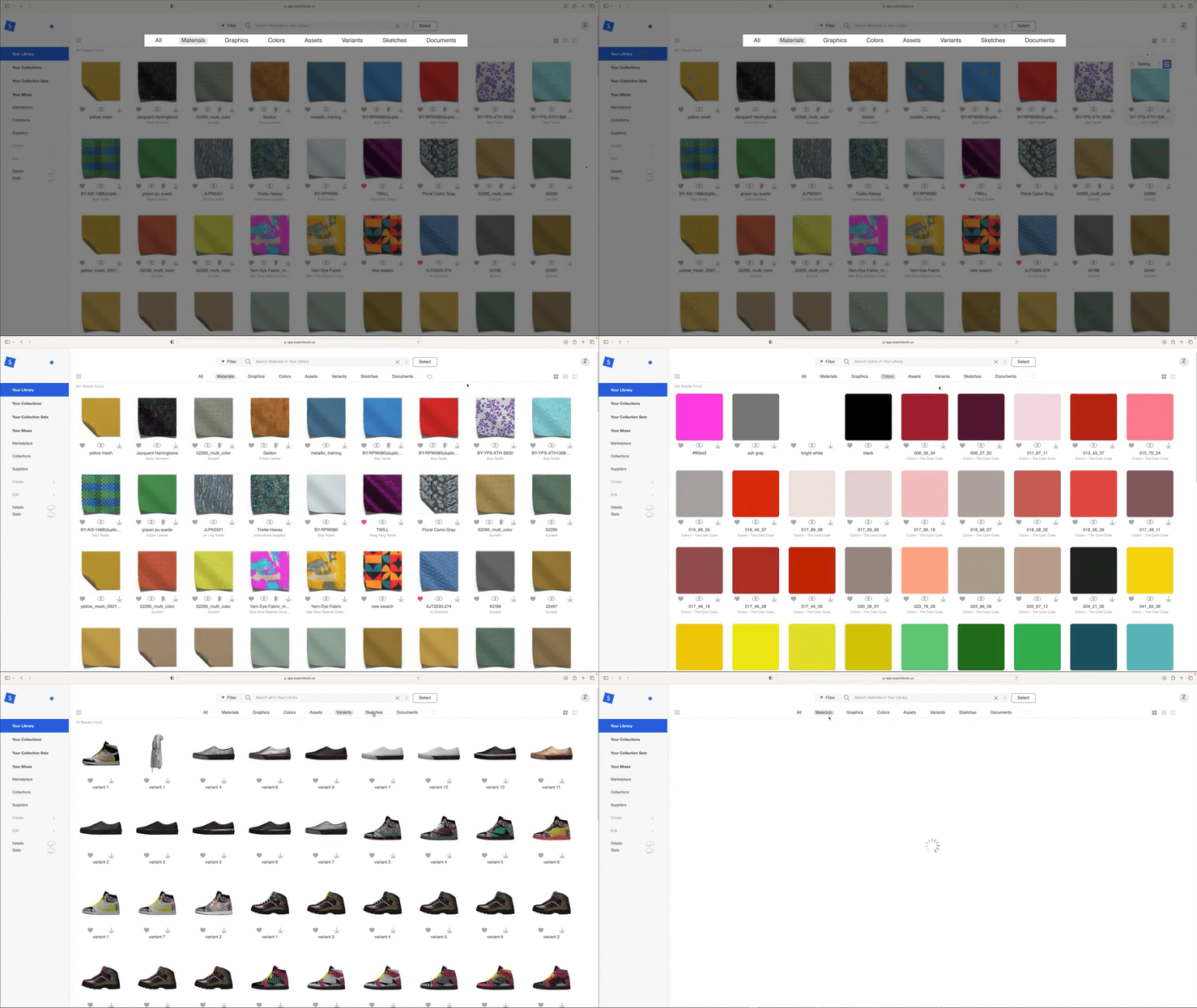
Material library
The central repository of pre-digitized content. All visual material in Swatchbook has already been captured and processed — there is no live simulation.
What you can do in the library
- View materials as flat images or as real-time 3D drapes and renders
- Rotate, zoom, and reposition 3D-rendered materials
- Switch between standardized lighting setups (studio, outdoor, overcast, night, retail)
- View reference video of physical material handling — drape, stretch, transparency — when available
- Capture clean screenshots (background removed, shadow retained) for external use
- Apply a material to standard 3D assets or your organization's own uploaded assets
- Distinguish between supplier-provided color variations and ones created internally
Content structure per material
Overview
Supplier, pricing (or "price on request"), color branch availability.
Tags
Organization- or supplier-defined descriptive labels used in search and filtering.
Metadata
A standardized, industry-aligned set of data fields describing the material. Visible to anyone with access.
Organization metadata
A private data layer visible only internally. Used for PLM numbers, physical sample locations, custom sustainability scores, or free-form notes. Also accessible through the API.
Collections & sets
Collections are folders for your library content — group any mix of materials, colors, graphics, assets, and more into one place, then share or organize them into Collection Sets.
The grouping hierarchy
A grouping of any combination of materials, graphics, colors, assets, variants, sketches, or documents. Can be marked as created by you, shared with you, or shared by you.
A folder-like grouping of multiple collections. For example, grouping an apparel season collection and a footwear season collection into one combined set.
Swatches In Progress. An automatically maintained collection that surfaces any content not yet in an "Approved" development phase. Items are removed automatically once approved.
A personal collection of items marked with the heart icon. Private to the individual user.
What collections support
- Visibility control — private or organization-wide
- Sharing with individuals, groups, or an entire organization — including to people outside Swatchbook (who receive a Viewer License invitation)
- Bulk actions across multiple collections at once: share, tag, download, request samples, export
- Export to spreadsheet — note that the exported data set is fixed rather than user-selectable at export time
Marketplace & suppliers
A separate content space from your personal library — made up of content suppliers choose to expose broadly rather than share directly.
Who can see what
Users with an Admin or Creator license can browse all suppliers in the Marketplace. Admins can also control what other users in the organization see — including restricting access to approved suppliers only.
Suppliers cannot see brands or other suppliers on the platform. They have no visibility into anything outside their own content and organization.
Marketplace tabs
Suppliers
Browse supplier showrooms filterable by country. Infinite-scroll browsing of materials, collections, and 3D assets. Direct sample requests and inquiries from within the platform.
Content providers
A dedicated tab for color content providers and their digital color libraries. Current providers include Pantone, Coloro, Archroma, and CSI.
Downloadable files
Marketplace content is downloadable as long as file types are attached to the material. Every material on the platform includes:
- PBR maps — diffuse, metallic, normal, roughness, displacement, alpha
- U3M — universal 3D material format for CLO and other simulation tools
Suppliers may optionally attach additional file types at no extra cost to the user:
- zFab — physical property file for CLO simulation
- U3MA — U3M with animation data
- Any other file type the supplier chooses to provide
How supplier visibility works
Suppliers control their own visibility. Not all supplier inventory is shown in the Marketplace — some content is reserved for direct, seasonal, or exclusive engagement with specific brands. What you see is only what a supplier has chosen to surface publicly.
Search & filtering
Tag-based search combined with structured filters, a similarity engine, and multiple sort options.
Search capabilities
- Search looks across tags, metadata, organization metadata, and specific file types — not just tag labels
- Combined with structured filters (material type, country of origin, color, supplier, etc.)
- Filters are split into platform-standard filters and organization-specific custom filters — admins can define and toggle visibility for custom filters
- Multiple sort options: newest/oldest, alphabetical, popularity, pricing, sustainability, recently viewed — all invertible between ascending and descending
Filter types
Platform-standard
Built-in filters available to all organizations — material type, country of origin, color, supplier, file type, and similar categorical fields.
Custom filters
Organization-specific filters defined by an admin. Visibility per filter can be toggled on or off for your users.
Search for similar
Find related content based on any item in your search results. The user selects which category they want to search similar by — the comparison can be made across:
- Color (HEX, Pantone, Coloro)
- Material type
- Supplier
- Tags
- Metadata fields
- Other platform-defined comparable fields
Color management
Swatchbook supports native color libraries and material-specific color branches — recolored versions of an existing material.
Creating colors
- Via a color picker (HEX / RGB / HSL)
- Manual value entry
- Importing an ASE file
Color branches
A color branch is a recolored version of an existing material. Branches can be created using:
- A color picker
- An existing color library
- An existing collection
- An uploaded ASE file
- A disk upload of an externally recolored image
Color branches created by the supplier or original owner. Shown in gray in the interface.
Branches you created internally. Shown in pink in the interface. Visible only within your organization unless placed into a shared collection.
Color locking & metadata
- Certain colors on a material can be locked to prevent downstream recoloring by other users of that material
- Colors sourced from a personal color library retain traceable metadata — color ID, dye information, color supplier data
- Colorways a user creates internally are private to their organization unless deliberately placed into a shared collection
Smart tags & 3D visualization
Smart tags let a material be quickly associated with relevant 3D assets for visualization. Assets can come from Swatchbook's standard library or from assets your organization uploads.
How smart tags work
- Assets are organized by functional / use classification so relevant options surface automatically when viewing a material
- An asset must reach the Approved development phase before it can be linked into the smart tag system
- QR codes can be generated for materials, assets, and colors — scannable through the Swatchbook mobile app to pull up the digital item directly
The Mix application
Mix is a separate application within the Swatchbook ecosystem that enables:
- Applying different materials to different parts of the same 3D asset
- Generating Variants — outputs from different material/color combinations
- High-quality (4K) renders (which consume render tokens — a separate resource)
Mix requires a high-resolution asset with proper part names and full UV mapping. Not all assets in the library are compatible with multi-material application.
Graphics on 3D assets
Custom graphics can be applied on top of a 3D asset with some layout customization. This is a limited-scope feature — it is not a full print placement tool.
Duplication & branching
Two distinct mechanisms exist for creating a working copy of a material. Choose based on whether you want the copy to stay connected to the original.
Standalone copy
Creates a fully standalone copy, disconnected from the original owner or supplier. Changes to the original no longer propagate to the duplicate. Bulk duplication is not currently supported.
Connected copy
Creates a copy that stays connected to the original. Unedited fields continue to update if the original changes. Any field you edit becomes permanently disconnected from the original for that field only.
Breaking a branch
A branch can be "broken" at any time, converting it into a fully standalone duplicate. Once broken, no fields will continue to update from the original.
Material digitization
Digitization — turning a physical sample into digital content — is a service capability, not a self-serve platform feature.
How digitization works within Swatchbook
- Swatchbook operates its own digitization hub and works with a network of regional partner hubs, each with different technical capabilities (soft trims, hard trims, physical measurement, recoloring)
- Digitization quality standards — resolution, maps captured, single- vs. double-sided scanning — are tailored per material type and per brand requirement rather than fixed
- Converting a material already digitized in one format into another format generally requires re-scanning the physical sample; physics and measurement data does not reliably translate between formats automatically
- The platform is expanding its regional hub network to reduce turnaround time and shipping distance for physical samples
Output formats
Material maps can be exported and packaged in formats including:
- SBSAR — for use in Substance-compatible software
- MODO — for MODO 3D software
- U3M — universal 3D material format, used in CLO and other garment simulation tools
Additional formats are planned.
Development workflow
Every content item in Swatchbook — material, color, graphic, asset, sketch, document, or variant — moves through four development phases.
Swips — Swatches In Progress
Swips is a temporary, automatically managed collection that lives in the Collections tab. It acts as a single inbox for everything in your library that hasn't reached the Approved phase yet — so instead of hunting across multiple collections to find what's still in progress, you have one place to check.
How Swips works
- Any item in Start, Development, or Under Review is automatically added to Swips
- Once an item moves to Approved, it is automatically removed from Swips
- Swips is self-managing — you cannot manually add or remove items from it
- It always reflects the live development status of your entire library
Key rules
- Items in any phase other than Approved are automatically surfaced in Swips
- Content can be shared and added to collections at any development stage
- The one exception: smart-tag linkage for 3D assets requires the Approved phase
Where tracking lives
Development tracking can live entirely within Swatchbook, entirely within a connected PLM system, or be split across both depending on the supplier relationship. When a Centric PLM integration is active, phase statuses can sync between systems.
Sample requests
Physical sample requests can be initiated directly from within the platform, for a single material or for an entire collection.
How to request
- Request samples for a single material or for an entire collection — including multiple collections at once
- Specify single- or multi-color per request
- Add notes to the request before sending
Sharing & notifications
Flexible sharing to individuals, groups, or entire organizations — including to external people who receive a Viewer License invitation.
Sharing controls
- Share collections with individuals, groups, or an entire organization
- Share externally with anyone — recipients outside Swatchbook receive a Viewer License invitation and can only see what was explicitly shared with them. They have no visibility into any other content inside your organization.
- This is particularly useful for suppliers, who can share curated collections of materials with different brand clients — whether those clients have a Swatchbook account or not.
- Auto-accept settings for incoming shares, with an option to require manual approval instead
- Approval workflow for re-shares — if a share recipient tries to forward content to someone else, you can require your approval
Notifications
Configurable email notifications cover:
- Collection sharing activity
- Subscription and license dates
- Storage threshold alerts
- Render token usage
Sync desktop app
A one-way "Sync" desktop app pulls selected collections from Swatchbook down to a local workstation. This is a one-way operation: Swatchbook to local only. It is primarily used as a workaround for browser-based bulk-download limitations.
Integrations & data
A REST API, a direct Centric PLM plugin, and exportable material map packages connect Swatchbook to external systems.
REST API
Offered as an upgrade package. Supports pushing and pulling data between Swatchbook and an organization's PLM or other internal systems. Organization Metadata is API-syncable, allowing internal-only data to flow to and from other systems.
Centric PLM integration
A direct, pre-built plugin exists specifically for Centric PLM. Development phase statuses and metadata fields can sync between the two systems.
Material map export formats
Substance-compatible software
MODO 3D software
Universal 3D material — CLO and garment simulation tools
Additional formats are planned.
User & org admin
User roles, permissions, org-level settings, contacts, groups, and storage.
User roles
| Permission | Admin | Pro | Designer |
|---|---|---|---|
| Manage users & permissions | Yes | No | No |
| Create & edit products/materials | Yes | Yes | Limited |
| Marketplace visibility | Admin-controlled | Yes | Yes |
| Sample request | Admin-controlled | Yes | Configurable |
| Asset download | Admin-controlled | Yes | Configurable |
| Define custom metadata / filters | Yes | No | No |
Admins can adjust granular permissions per individual user beyond the role defaults above.
Org-level settings
- License counts and storage consumption visibility
- Custom metadata layer — additional fields an organization defines beyond standard platform metadata (tags, physical location, end use, negotiated pricing, internal IDs, custom sustainability scores)
- Storage comes with a standard allotment per license, increasable on request
- Render tokens are a separate resource consumed by high-quality (4K) renders generated through Mix
Contacts & groups
Organizations can maintain internal and external contact lists and bundle them into Groups for easier bulk sharing. Viewer License invitations (for external sharing) are managed through the contacts system.
When a user is removed
When a licensed user is removed from an organization, their content is reassigned to another current member rather than deleted.
Analytics
Usage analytics at the organization level covering activity, engagement, and sample behavior.
What's tracked
Session activity
Login sessions and active usage across your organization.
Collection & swatch views
Which collections and individual swatches were viewed, and how often.
Shares & downloads
Outbound sharing activity and asset download counts.
Sample requests
Volume and breakdown of physical sample requests made through the platform.
Known limitations
Current platform boundaries worth knowing — particularly relevant when setting expectations with clients or suppliers.
| Limitation | Detail |
|---|---|
| No live simulation | All visual content is pre-processed. Swatchbook does not perform on-the-fly material simulation. |
| No format auto-conversion | Converting a material from one digitization format to another generally requires re-scanning the physical sample. Physics data does not reliably translate between formats. |
| Single material per asset in standard viewer | The standard real-time viewer applies one material across the entire 3D asset surface. Multi-material mapping requires the Mix application and a properly mapped asset. |
| No notification on material edits | If a material you rely on is edited by its owner, no notification is sent to you. |
| No external embedding | Content and collections cannot be embedded directly into external websites or social platforms. Only exported media (images, video) can be reused externally. |
| No bulk duplication or bulk smart-tagging | Both are deliberate current limitations. Both are on the roadmap. |
| No in-platform purchasing | The platform provides communication and visual access only. Orders cannot be placed through Swatchbook. |
| No front-and-back simultaneous drape | Front-and-back rendering on a single 3D drape is not currently supported. Both sides can be scanned and stored on the same material record if requested. |
| Fixed export columns | When exporting a collection to spreadsheet, the data fields included are fixed and not user-selectable. |
| Sync is one-way | The desktop Sync app pulls content from Swatchbook to local only — not the reverse. |
Glossary
Key terms used across the Swatchbook platform.